Showing posts with label tutorial. Show all posts

St Patrick's Day!

I've done my first "live" tutorial in honour of St Patricks Day! Being an active teacher, my hands are really destroyed after working with kids (and washing them constantly!), so I've never made a tutorial where my hands were seen before. Instead, I've stuck to computer tutorials. Well, it's time to break out of my box! Here's this week's project, bobby pin ribbon Shamrocks:


and the video tutorial on how to make them. They're lots of fun and pretty simple once you get the hang of it!


Please feel free to go to my channel on Youtube to view it bigger and in HD!

And here they are in "hair"! This is actually my daughter's dance wig, but I'll have a chance later this week to take some "real" photos :-)
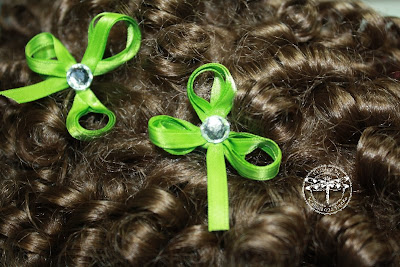
Photo Restoration with GIMP tutorial

For this week's LO I restored an old childhood photo. Here's the original:


And the edited version:


Major fixes were the large damaged area bottom right and the extensive scratching and discolouration. Less noticeable but important to the finished picture were the correction of the background and removal of the wire on the right. Here's a quick tutorial on how to do fixes like this using free software called GIMP:


Best watched on Youtube in 720p for a sharper video :-)

Thanks for stopping by! Love to hear your comments :-)

New Tutorial! Creating tags with printing!

For the journalling on my latest layout, I wanted to hide it behind the main picture. It was also a pretty long story, so I needed to type this one out rather than write by hand -- my solution: use my nestie look-a-like font and printer! It looked so good, I decided to make a new tutorial! Hope you enjoy! For this video and tag I used SCAL2, but it would be the same idea if you were a DS user.


Inkscape Tutorial part 2

Well, I hadn't planned on making Part 2 until the weekend, but a surprise trip has been sprung on me and I'm off for nearly two weeks camping, so I thought I'd better get it done and online. If you're working on your own files but having some concerns this next tutorial will help you fix the most common problem: original image line gaps. They're easy to fix. If you're interested in GIMP, please visit http://www.gimp.org/ but any graphic editing software will work, including Windows Paint. I hope you find it helpful, while I'm off in the Black Hills finding more reasons to scrap. I hope there's some nice LSS on the way....

Inkscape files

Some people would like to follow along with the tutorial, using my original gif. So, here it is! You should be able to "right-click" and save directly to your computer.

Hope this helps! And thanks for all the feedback!

Inkscape Tutorial


Wow! Today I made my first tutorial -- I really hope it helps you! Please leave a comment if you found it useful! The associated svg/scut/jpg files will be available for download on the weekend!

ETA: This is the medium-quality video, and is a bit blurry in places. I'm still trying to upload the HQ, but it's taking forever! Two things will help you watch successfully: watch "full screen" and click the "HD" button beside the volume to watch in high definition.